The remote is lost
Down the sofa, out of batteries, or chewed by the dog. Open AirMouse and the TV is already in the list.
D-pad, power and volume, right away
Remote, touchpad, air mouse and keyboard for your smart TV, over Wi-Fi or Bluetooth.
No account. No ads. No analytics.
Continue watching
Apps
Or isn't there at all. AirMouse is built around the situations that send people looking for a remote app.
Down the sofa, out of batteries, or chewed by the dog. Open AirMouse and the TV is already in the list.
D-pad, power and volume, right away
A Samsung in the living room, an LG in the bedroom, a Roku in the kitchen. One app runs all of them.
Named TVs, switched in a tap
Searches, passwords and sign-in codes, typed letter by letter with a D-pad. Or with your phone's keyboard in seconds.
Keyboard, paste and voice
Browsers and apps that weren't built for a D-pad. Point with the air mouse or glide on the touchpad.
A real pointer on LG and Bluetooth
Large keys, spoken names for every control, haptics you can feel, and a setting for even larger keys.
TalkBack, larger keys, key labels
A holiday rental or a hotel room. No account to make, and plain guidance when something isn't set up.
No sign-up, clear fixes
The remote shows what you press every session. The rest is one tap away. Switch modes and the rest of the screen stays put.
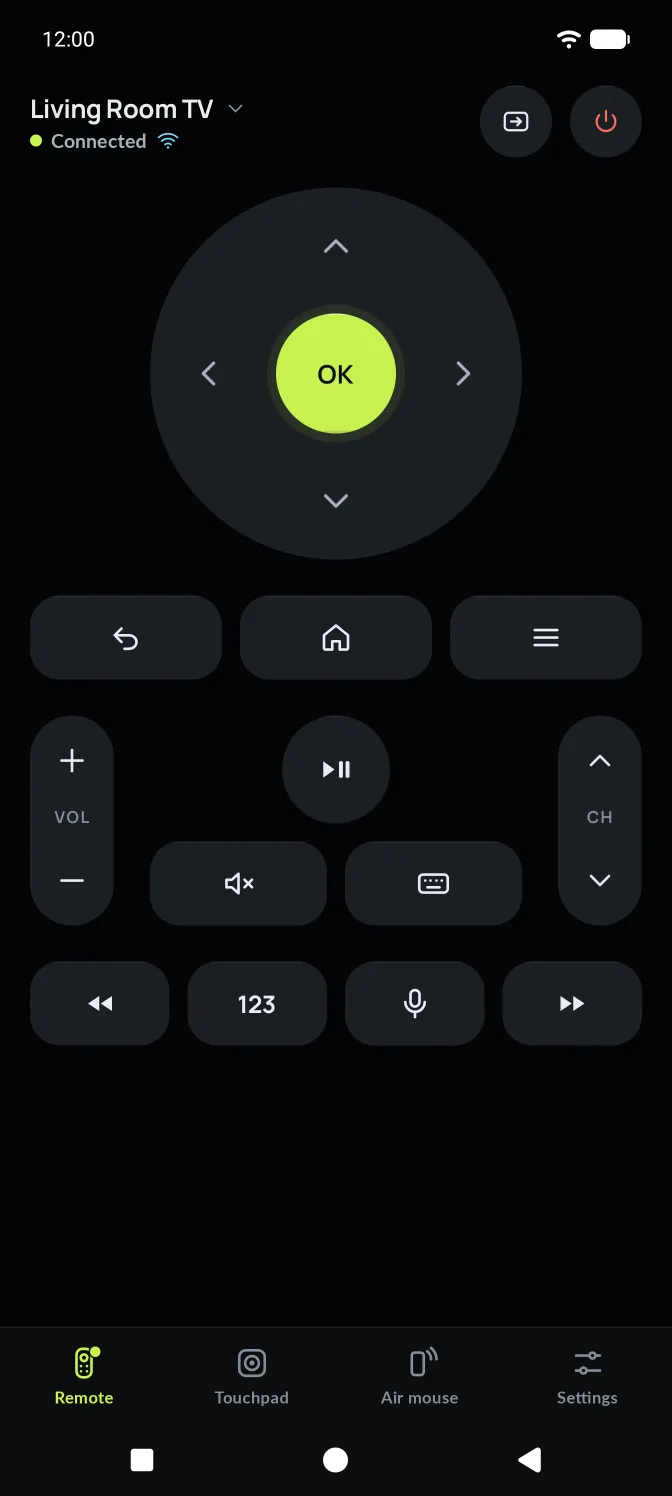
A large D-pad with a single bright OK. Back, Home and Menu below it. Volume on the left, channel on the right. Tap to step once, hold to repeat. Power and Input sit in the header.
Drag to move, tap to click, use two fingers or the right-hand rail to scroll. On LG TVs and over Bluetooth it moves a real pointer. On other TVs, swipes become D-pad steps.
Hold the orb and move your wrist, like a laser pointer for your TV. Let go and the pointer parks. Recenter puts it back in the middle of the screen.
Search, sign in and fill forms with your phone's own keyboard. Text appears on the TV as you type. Paste from your phone, or send a search straight to the TV.
Numbers, the four colour keys, Guide, Info and Subtitles live in one sheet. The main remote stays calm.
Pair once and AirMouse reconnects to the same TV the next time you open it.
Wi-Fi for smart TVs on the same network as your phone. Bluetooth for streaming sticks and TVs without Wi-Fi.
AirMouse searches your Wi-Fi for Google TV, Samsung, LG and Roku. Not listed? Enter its IP address.
Enter the code shown on the TV, or choose Allow. Roku needs neither. You only do this once.
Google TV shows a code
Letters A–F and numbers 0–9
A device wants to control this TV.
The TV's name and connection sit at the top of every control screen. AirMouse says which method it's using, every time.
For smart TVs on the same network as your phone. AirMouse finds them for you. The first time, you confirm on the TV.
For streaming sticks and TVs without Wi-Fi. Your phone pairs as a keyboard and mouse, so anything that accepts a Bluetooth keyboard works.
Your TVs
Living room, bedroom, kitchen. Switch TVs in a tap. AirMouse checks which ones are on and reachable before you pick.
A phone-native controller, not a physical remote drawn on glass. Every press answers at once: the key sinks, darkens and taps back.
Navigation
The D-pad, with one bright OK where your thumb lands
Pointer
Touchpad and air mouse, in Ion blue for air and motion
Commands
Back, Home, Menu, Mute and Keyboard
Levels
Volume and channel rockers. Tap to step, hold to repeat.
Media
Play, pause, rewind and fast-forward
No animation delays a command. The key reacts the moment your finger lands.
A light tap for keys, a firmer one for OK, a tick for each volume step and a stop at the limit.
The main remote shows what you press every session. Numbers and colour keys are one tap away.
Controls dim instead of disappearing, and AirMouse quietly reconnects for ten seconds before asking you. State is shown by the dot's shape and a word, never by colour alone.
Connected
Keys go straight to the TV
Connecting
Pulsing while AirMouse reaches the TV
Pairing
Waiting for you to confirm on the TV
Not connected
Paired before, not connected right now
Off or out of range
The TV doesn't answer on the network
Couldn't connect
With the reason and what to try next
AirMouse supports TV platforms, not just brands. Sony, TCL, Philips and Xiaomi TVs run Google TV. Many TCL and Hisense TVs run Roku.
Sony, TCL, Philips, Xiaomi, Chromecast and more
Smart TVs from 2016 and later
LG smart TVs
Roku players and Roku TVs
Any TV, projector, stick or computer that accepts one
Fire TV, Apple TV and Vizio. AirMouse recognises them and says so.
No account, no servers of its own, no ads and no analytics. Your TVs and settings are stored on your phone, with connection keys encrypted by your phone's secure hardware.
Asked only when needed, with a reason first
Nothing tappable is under 48 points. Remote keys are 56, OK is 72.
Every control has a TalkBack label, like "Volume up" or "OK, select".
A bigger D-pad and fewer keys per row. Turn on key labels for words under icons.
Off, light or strong. Information is never given by sound alone.
No. AirMouse talks to your TV over Wi-Fi or Bluetooth. TVs that only accept infrared aren't supported.
No. Open the app, pick your TV and confirm on the TV.
Yes. Over Wi-Fi, commands go straight from your phone to your TV on your home network. Bluetooth needs no network at all. Voice search may use your phone's speech service online.
Not yet. AirMouse is for Android phones running Android 7 or later.
Install AirMouse, choose Wi-Fi or Bluetooth, and confirm on your TV.